OpenAPIの定義とコードの実装がいつの間にかズレていて、フロント側から「仕様書と挙動が違う」と問い合わせが来たことが何度かあります。仕様書をその場しのぎで終わらせない構成を考えました。
内部API仕様書とは
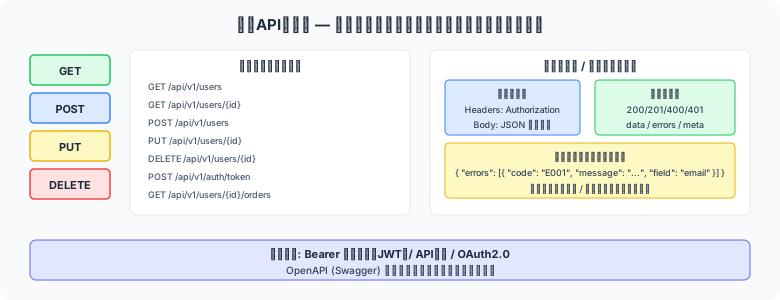
図1: エンドポイント設計の構成要素
内部API仕様書は、システム内部でフロントエンド(SPA・モバイルアプリ)とバックエンドが通信するためのAPIエンドポイント仕様を定義した設計書です。OpenAPI(Swagger)形式で記述することで、フロントエンド・バックエンドの並行開発が可能になります。
💡 API First設計のメリット
API仕様書(OpenAPI YAML)を先に確定させることで、① モックサーバーを自動生成してフロントエンド開発を先行させる ② バックエンドとフロントエンドの並行開発が可能になる ③ APIテストコードを自動生成できる ④ APIドキュメントサイトを自動生成できる(Swagger UI)というメリットがあります。
① エンドポイント一覧の設計
機能一覧表・画面一覧表をもとに、必要なAPIエンドポイントを設計します。
| API ID | HTTPメソッド | エンドポイントパス | 機能概要 | 認証 | 関連機能ID |
|---|---|---|---|---|---|
| API-001 | GET | /api/v1/products/ | 商品一覧取得(検索・ページング) | JWT必須 | F001 |
| API-002 | GET | /api/v1/products/{id}/ | 商品詳細取得 | JWT必須 | F002 |
| API-003 | POST | /api/v1/products/ | 商品登録 | JWT必須(担当者ロール以上) | F003 |
| API-004 | PUT | /api/v1/products/{id}/ | 商品更新(全項目) | JWT必須(担当者ロール以上) | F004 |
| API-005 | PATCH | /api/v1/products/{id}/ | 商品部分更新 | JWT必須(担当者ロール以上) | F004 |
| API-006 | DELETE | /api/v1/products/{id}/ | 商品論理削除 | JWT必須(管理者ロール以上) | F005 |
| API-010 | POST | /api/v1/auth/login/ | ログイン(JWTトークン発行) | 不要 | — |
| API-011 | POST | /api/v1/auth/refresh/ | JWTリフレッシュトークン更新 | リフレッシュトークン | — |
| API-020 | POST | /api/v1/orders/ | 受注登録 | JWT必須 | F010 |
② 認証・認可方式の定義
内部APIの認証方式を定義します。SPA(Single Page Application)との組み合わせでは JWT(JSON Web Token)が一般的です。
| 定義項目 | 設定値 | 備考 |
|---|---|---|
| 認証方式 | JWT(Bearer Token) | Authorization: Bearer {token} |
| アクセストークン有効期限 | 15分 | 短命にしてセキュリティリスクを低減 |
| リフレッシュトークン有効期限 | 7日 | HttpOnly Cookie で保持(XSS対策) |
| JWTペイロード | user_id, email, role, exp | センシティブ情報(パスワード等)は含めない |
| 署名アルゴリズム | RS256(非対称鍵) | 秘密鍵はサーバー側のみ保持 |
| 認可方式 | ロールベースアクセス制御(RBAC) | ロール: 一般ユーザー / 担当者 / 管理者 / システム管理者 |
③ リクエスト・レスポンス定義
API-003(商品登録)のリクエスト・レスポンス仕様の例を示します。
openapi: "3.0.3"
info:
  title: "受注管理システム API"
  version: "1.0.0"

paths:
  /api/v1/products/:
    post:
      summary: "商品登録"
      operationId: "createProduct"
      tags: ["商品管理"]
      security:
        - bearerAuth: []
      requestBody:
        required: true
        content:
          application/json:
            schema:
              $ref: "#/components/schemas/ProductCreate"
      responses:
        "201":
          description: "登録成功"
          content:
            application/json:
              schema:
                $ref: "#/components/schemas/ProductDetail"
        "400":
          $ref: "#/components/responses/ValidationError"
        "401":
          $ref: "#/components/responses/Unauthorized"
        "403":
          $ref: "#/components/responses/Forbidden"

components:
  schemas:
    ProductCreate:
      type: object
      required:
        - product_code
        - product_name
        - category_id
        - unit_price
        - tax_type
      properties:
        product_code:
          type: string
          maxLength: 20
          pattern: "^[A-Za-z0-9\\-]+$"
          example: "PROD-001"
        product_name:
          type: string
          maxLength: 100
          example: "サンプル商品"
        category_id:
          type: integer
          example: 1
        unit_price:
          type: number
          format: decimal
          minimum: 0
          maximum: 9999999.99
          example: 1980.00
        tax_type:
          type: integer
          enum: [0, 8, 10]
          example: 10
        description:
          type: string
          maxLength: 2000
          nullable: true

    ProductDetail:
      allOf:
        - $ref: "#/components/schemas/ProductCreate"
        - type: object
          properties:
            product_id:
              type: integer
              example: 42
            created_at:
              type: string
              format: date-time
            updated_at:
              type: string
              format: date-time

  responses:
    ValidationError:
      description: "バリデーションエラー"
      content:
        application/json:
          schema:
            $ref: "#/components/schemas/ErrorResponse"
          example:
            error_code: "VALIDATION_ERROR"
            message: "入力値が不正です"
            details:
              - field: "unit_price"
                message: "0以上の数値を入力してください"

  securitySchemes:
    bearerAuth:
      type: http
      scheme: bearer
      bearerFormat: JWT
④ エラーレスポンス設計
APIのエラーレスポンスは全エンドポイントで統一したフォーマットにします。エラーコード・メッセージ・詳細情報を含めることで、フロントエンド・クライアントがエラー種別を機械的に判別できます。
| HTTPステータス | エラーコード | 説明 | レスポンス例 |
|---|---|---|---|
| 400 Bad Request | VALIDATION_ERROR | 入力バリデーションエラー | {"error_code":"VALIDATION_ERROR","message":"入力値が不正です","details":[...]} |
| 401 Unauthorized | UNAUTHORIZED | 認証トークンがない・無効 | {"error_code":"UNAUTHORIZED","message":"認証が必要です"} |
| 403 Forbidden | FORBIDDEN | 権限不足 | {"error_code":"FORBIDDEN","message":"この操作を行う権限がありません"} |
| 404 Not Found | NOT_FOUND | リソースが見つからない | {"error_code":"NOT_FOUND","message":"指定された商品は存在しません"} |
| 409 Conflict | CONFLICT | 重複・整合性エラー | {"error_code":"CONFLICT","message":"この商品コードは既に使用されています"} |
| 500 Internal Server Error | INTERNAL_ERROR | サーバー内部エラー | {"error_code":"INTERNAL_ERROR","message":"システムエラーが発生しました。管理者に連絡してください"} |
⑤ APIバージョニング方針
APIのバージョニング方針を設計段階で決定します。
- URLパスバージョニング:
/api/v1/products/→/api/v2/products/(最も一般的で実装が簡単) - 後方互換性の維持:既存エンドポイントへの破壊的変更は禁止。追加は許容
- 非推奨(Deprecated)通知:廃止予定エンドポイントには
Deprecationレスポンスヘッダーを付与し、6ヶ月以上の移行期間を設ける - バージョンサポート期間:旧バージョンは次バージョンリリース後12ヶ月間サポート
Python Tips — OpenAPI仕様書からAPIテストコードを生成する
"""
APIエンドポイントの基本的な自動テスト。
pip install requests pytest
"""
import requests
import pytest

BASE_URL = "http://localhost:8000/api/v1"
ADMIN_CREDS = {"email": "admin@example.com", "password": "testpass123"}


@pytest.fixture(scope="session")
def auth_token() -> str:
    """JWTアクセストークンを取得するフィクスチャ"""
    resp = requests.post(f"{BASE_URL}/auth/login/", json=ADMIN_CREDS)
    assert resp.status_code == 200, f"ログイン失敗: {resp.json()}"
    return resp.json()["access_token"]


@pytest.fixture
def auth_headers(auth_token: str) -> dict:
    return {"Authorization": f"Bearer {auth_token}"}


class TestProductAPI:

    def test_list_products(self, auth_headers):
        """商品一覧取得 - 正常系"""
        resp = requests.get(f"{BASE_URL}/products/", headers=auth_headers)
        assert resp.status_code == 200
        data = resp.json()
        assert "results" in data      # ページネーション形式
        assert "count" in data

    def test_create_product_success(self, auth_headers):
        """商品登録 - 正常系"""
        payload = {
            "product_code": "TEST-001",
            "product_name": "テスト商品",
            "category_id": 1,
            "unit_price": 1500,
            "tax_type": 10,
        }
        resp = requests.post(f"{BASE_URL}/products/", json=payload, headers=auth_headers)
        assert resp.status_code == 201
        data = resp.json()
        assert data["product_code"] == "TEST-001"
        assert "product_id" in data

    def test_create_product_validation_error(self, auth_headers):
        """商品登録 - バリデーションエラー(価格が負)"""
        payload = {
            "product_code": "TEST-ERR",
            "product_name": "エラーテスト",
            "category_id": 1,
            "unit_price": -100,   # ← バリデーションエラー
            "tax_type": 10,
        }
        resp = requests.post(f"{BASE_URL}/products/", json=payload, headers=auth_headers)
        assert resp.status_code == 400
        data = resp.json()
        assert data["error_code"] == "VALIDATION_ERROR"

    def test_get_product_not_found(self, auth_headers):
        """商品詳細取得 - 存在しないID"""
        resp = requests.get(f"{BASE_URL}/products/99999/", headers=auth_headers)
        assert resp.status_code == 404
        assert resp.json()["error_code"] == "NOT_FOUND"

    def test_unauthorized_without_token(self):
        """認証なしアクセス - 401エラー"""
        resp = requests.get(f"{BASE_URL}/products/")
        assert resp.status_code == 401
定義チェックリスト
| チェック項目 | 確認ポイント |
|---|---|
| □ 全機能に対応するエンドポイントが設計されているか | 機能一覧の全小機能に対応するAPIエンドポイントが定義されているか |
| □ HTTPメソッドがRESTful原則に従っているか | GET=参照・POST=作成・PUT/PATCH=更新・DELETE=削除の原則に従っているか |
| □ 認証・認可方式が定義されているか | JWT方式・トークン有効期限・ロールベースアクセス制御が定義されているか |
| □ リクエスト・レスポンスが全エンドポイントに定義されているか | 全入出力項目の名称・型・必須/任意が定義されているか |
| □ エラーレスポンスが統一フォーマットになっているか | 全エンドポイントで一貫したエラーレスポンス構造が定義されているか |
| □ OpenAPI仕様書(YAML)として管理されているか | モックサーバー・テスト自動生成ができる形式で管理されているか |