Selenium時代のflakyなE2Eテストに疲弊していたところ、Playwrightの自動待機機構に助けられました。Page Object Modelでの構造化とCI連携まで、実際に組んだ構成を書いています。
インストールと初期設定
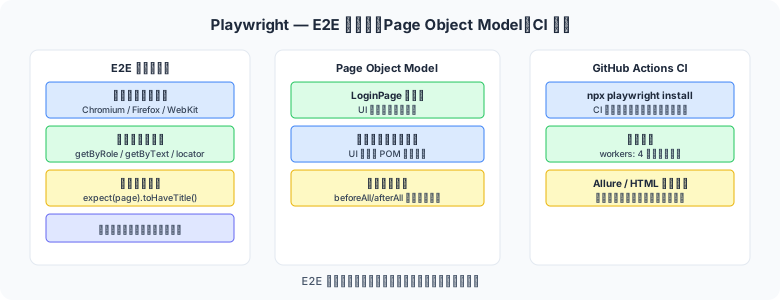
図1: Page Object ModelとCI連携の構成
# Node.js プロジェクトへのインストール
npm init playwright@latest

# ブラウザバイナリのダウンロード
npx playwright install

# TypeScript プロジェクトの設定(playwright.config.ts)
import { defineConfig, devices } from "@playwright/test";

export default defineConfig({
  testDir: "./tests/e2e",
  timeout: 30_000,           // テストタイムアウト 30 秒
  retries: process.env.CI ? 2 : 0,   // CI では失敗時に2回リトライ
  reporter: [
    ["list"],
    ["html", { outputFolder: "playwright-report" }],
  ],
  use: {
    baseURL: "http://localhost:3000",
    trace: "on-first-retry",      // 失敗時のトレースを記録
    screenshot: "only-on-failure",
    video: "retain-on-failure",
  },
  projects: [
    { name: "Chromium", use: { ...devices["Desktop Chrome"] } },
    { name: "Firefox",  use: { ...devices["Desktop Firefox"] } },
    { name: "Mobile",   use: { ...devices["iPhone 13"] } },
  ],
});
基本的なテスト記述
// tests/e2e/login.spec.ts
import { test, expect } from "@playwright/test";

test.describe("ログイン機能", () => {

  test.beforeEach(async ({ page }) => {
    await page.goto("/login");
  });

  test("正しい認証情報でログインできる", async ({ page }) => {
    // 入力
    await page.getByLabel("メールアドレス").fill("user@example.com");
    await page.getByLabel("パスワード").fill("Password123!");

    // ボタンクリック
    await page.getByRole("button", { name: "ログイン" }).click();

    // ダッシュボードにリダイレクトされることを確認
    await expect(page).toHaveURL("/dashboard");
    await expect(page.getByText("ようこそ")).toBeVisible();
  });

  test("誤ったパスワードはエラーメッセージを表示", async ({ page }) => {
    await page.getByLabel("メールアドレス").fill("user@example.com");
    await page.getByLabel("パスワード").fill("wrong-password");
    await page.getByRole("button", { name: "ログイン" }).click();

    await expect(page.getByText("メールアドレスまたはパスワードが違います"))
        .toBeVisible();
    await expect(page).toHaveURL("/login");  // リダイレクトされない
  });

  test("メールアドレス未入力はバリデーションエラー", async ({ page }) => {
    await page.getByRole("button", { name: "ログイン" }).click();

    await expect(page.getByText("メールアドレスを入力してください"))
        .toBeVisible();
  });
});
ロケーター — 要素の特定方法
Playwright のロケーターは、変更に強い意味的なセレクターを優先します。
| ロケーター | 用途 | 例 |
|---|---|---|
getByRole() | ARIA ロールで特定(最推奨) | getByRole("button", {name:"送信"}) |
getByLabel() | フォームラベルで特定 | getByLabel("メールアドレス") |
getByText() | テキスト内容で特定 | getByText("ようこそ") |
getByPlaceholder() | placeholder 属性で特定 | getByPlaceholder("例: user@...") |
getByTestId() | data-testid 属性(最安定) | getByTestId("submit-btn") |
locator(css) | CSS セレクター(最終手段) | locator(".error-message") |
⚠️ XPath・CSS セレクターへの過度な依存を避ける
locator("div > span:nth-child(3)") のような脆弱なセレクターは HTML 構造の変更で壊れます。getByRole / getByLabel / getByTestId を優先し、どうしても CSS が必要な場合のみ使用してください。
アサーション
// Playwright の自動待機アサーション(expect)
// 条件が満たされるまで最大 timeout まで自動でリトライする

// 表示確認
await expect(page.getByText("保存しました")).toBeVisible();
await expect(page.getByRole("dialog")).toBeHidden();

// URL・タイトル確認
await expect(page).toHaveURL("/dashboard");
await expect(page).toHaveTitle(/ダッシュボード/);

// 属性・値の確認
await expect(page.getByRole("textbox", { name: "名前" }))
    .toHaveValue("山田太郎");
await expect(page.getByRole("checkbox", { name: "同意する" }))
    .toBeChecked();

// 件数確認
await expect(page.getByRole("row")).toHaveCount(5);

// テキスト内容確認
await expect(page.getByTestId("user-count"))
    .toHaveText("10 件");

// 有効・無効状態の確認
await expect(page.getByRole("button", { name: "送信" }))
    .toBeEnabled();
await expect(page.getByRole("button", { name: "戻る" }))
    .toBeDisabled();
Page Object Model(POM)
Page Object Model はページの操作をクラスにカプセル化するデザインパターンです。テストコードの重複を排除し、UI 変更時の修正コストを最小化します。
// page-objects/LoginPage.ts
import { Page, Locator, expect } from "@playwright/test";

export class LoginPage {
    private readonly page: Page;
    private readonly emailInput: Locator;
    private readonly passwordInput: Locator;
    private readonly submitButton: Locator;
    private readonly errorMessage: Locator;

    constructor(page: Page) {
        this.page          = page;
        this.emailInput    = page.getByLabel("メールアドレス");
        this.passwordInput = page.getByLabel("パスワード");
        this.submitButton  = page.getByRole("button", { name: "ログイン" });
        this.errorMessage  = page.getByTestId("login-error");
    }

    async navigate() {
        await this.page.goto("/login");
    }

    async login(email: string, password: string) {
        await this.emailInput.fill(email);
        await this.passwordInput.fill(password);
        await this.submitButton.click();
    }

    async expectError(message: string) {
        await expect(this.errorMessage).toHaveText(message);
    }
}

// テストでの使用
// tests/e2e/login-pom.spec.ts
import { test, expect } from "@playwright/test";
import { LoginPage } from "../page-objects/LoginPage";

test("POM パターンでのログインテスト", async ({ page }) => {
    const loginPage = new LoginPage(page);
    await loginPage.navigate();
    await loginPage.login("user@example.com", "Password123!");
    await expect(page).toHaveURL("/dashboard");
});
スクリーンショット・動画・トレース
// スクリーンショットの取得
await page.screenshot({ path: "screenshots/dashboard.png", fullPage: true });

// 特定要素のスクリーンショット
await page.getByTestId("chart").screenshot({ path: "chart.png" });

// ── playwright.config.ts での設定 ──
use: {
    // 失敗時のみスクリーンショット
    screenshot: "only-on-failure",
    // 失敗時のみ動画記録
    video: "retain-on-failure",
    // 失敗した最初のリトライ時にトレースを記録
    trace: "on-first-retry",
},

// ── トレースビューアでの分析 ──
// トレースを手動で開始・停止することも可能
await context.tracing.start({ screenshots: true, snapshots: true });
// ... テスト操作 ...
await context.tracing.stop({ path: "trace.zip" });
// コマンドラインで確認
// npx playwright show-trace trace.zip
ネットワーク傍受(API モック)
外部 API への依存をモックすることで、テストを独立させ実行速度を向上できます。
test("API エラー時に適切なエラー画面を表示", async ({ page }) => {
    // 特定 API リクエストをインターセプトしてエラーを返す
    await page.route("**/api/users", route => {
        route.fulfill({
            status: 500,
            contentType: "application/json",
            body: JSON.stringify({ error: "Internal Server Error" }),
        });
    });

    await page.goto("/users");
    await expect(page.getByText("サービスが利用できません")).toBeVisible();
});

test("ユーザー一覧を固定データで表示テスト", async ({ page }) => {
    // API レスポンスを固定データに差し替え
    await page.route("**/api/users", route => {
        route.fulfill({
            status: 200,
            contentType: "application/json",
            body: JSON.stringify([
                { id: "1", name: "山田太郎", email: "taro@example.com" },
                { id: "2", name: "鈴木花子", email: "hanako@example.com" },
            ]),
        });
    });

    await page.goto("/users");
    await expect(page.getByText("山田太郎")).toBeVisible();
    await expect(page.getByText("鈴木花子")).toBeVisible();
    await expect(page.getByRole("row")).toHaveCount(3); // ヘッダー行 + 2行
});
GitHub Actions 連携
# .github/workflows/e2e.yml
name: E2E Test — Playwright

on:
  push:
    branches: [main, develop]
  pull_request:

jobs:
  playwright:
    runs-on: ubuntu-latest
    steps:
      - uses: actions/checkout@v4

      - uses: actions/setup-node@v4
        with:
          node-version: 20
          cache: npm

      - name: Install dependencies
        run: npm ci

      - name: Install Playwright browsers
        run: npx playwright install --with-deps

      - name: Start application
        run: npm run start:test &   # テスト用アプリを起動
        env:
          NODE_ENV: test

      - name: Wait for app to be ready
        run: npx wait-on http://localhost:3000 --timeout 30000

      - name: Run Playwright tests
        run: npx playwright test

      - name: Upload Playwright report
        uses: actions/upload-artifact@v4
        if: always()
        with:
          name: playwright-report
          path: playwright-report/
まとめ
getByRole / getByLabel / getByTestIdを使った意味的ロケーターで変更に強いテストを書く- Page Object Model でページ操作をカプセル化し、テストコードの重複を排除する
trace: "on-first-retry"を設定して CI での失敗原因を トレースビューアで素早く特定する- ネットワーク傍受で外部 API への依存を除去し、エラー系・境界条件のテストを確実に実施する
- GitHub Actions では
npx playwright install --with-depsでブラウザのインストールを自動化する