テスト結果がコンソールログの羅列でしかなく、失敗原因を探すのに毎回時間がかかっていました。Allure Reportを導入してGradleとCIに組み込んだことで、その状況が大きく変わりました。
Gradle セットアップ
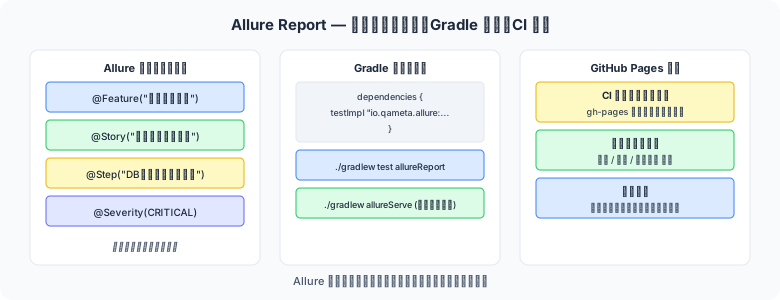
図1: Allure Reportの設定とCI連携フロー
// build.gradle
plugins {
    id "io.qameta.allure" version "2.11.2"   // Allure Gradle プラグイン
}

allure {
    adapter {
        autoconfigure = true   // 依存関係の自動設定
        frameworks {
            junit5 { enabled = true }
        }
    }
    version = "2.27.0"   // Allure Report のバージョン
}

dependencies {
    // JUnit 5 との統合
    testImplementation "io.qameta.allure:allure-junit5:2.27.0"

    // Cucumber との統合
    testImplementation "io.qameta.allure:allure-cucumber7-jvm:2.27.0"

    // REST Assured との統合(API テストレポートに含める場合)
    testImplementation "io.qameta.allure:allure-rest-assured:2.27.0"
}

// レポート生成コマンド
// ./gradlew test allureReport   → build/reports/allure-report/ に生成
// ./gradlew allureServe        → ローカルサーバーで即時確認
主要アノテーション
Allure アノテーションをテストクラスに付与することで、レポートにメタ情報を追加できます。
| アノテーション | 役割 | レポート上の表示 |
|---|---|---|
@Epic | エピック(最上位機能グループ) | Epic セクションでグループ化 |
@Feature | フィーチャー(機能) | Feature セクションでグループ化 |
@Story | ユーザーストーリー | Story セクションでグループ化 |
@Severity | 重要度(BLOCKER/CRITICAL/NORMAL/MINOR/TRIVIAL) | 重要度バッジで表示 |
@Step | テストのステップ(メソッドに付与) | ステップごとの実行ログ |
@Description | テストの詳細説明 | テスト詳細ページに表示 |
@Link | 課題追跡ツール(Jira など)へのリンク | クリッカブルリンク |
@Issue | バグトラッカーの課題 ID | Issue リンクとして表示 |
@Owner | テスト担当者 | 担当者フィルター |
JUnit 5 + Allure
import io.qameta.allure.*;
import org.junit.jupiter.api.*;
import static org.assertj.core.api.Assertions.*;

@Epic("ユーザー管理")
@Feature("ユーザー登録")
class UserRegistrationAllureTest {

    @Test
    @Story("正常登録フロー")
    @Severity(SeverityLevel.CRITICAL)
    @Description("有効な入力値でユーザーを登録し、登録完了メールが送信されることを確認する")
    @Owner("yamada.taro")
    @Issue("USER-123")
    @Link(name = "要件仕様書", url = "https://confluence.example.com/USER-123")
    @DisplayName("正常なユーザー登録 — 登録完了メールが送信される")
    void normalRegistration_sendsConfirmationEmail() {
        // Allure のステップ記録(ラムダ版)
        Allure.step("登録フォームに入力", () -> {
            registrationService.setName("山田太郎");
            registrationService.setEmail("taro@example.com");
            registrationService.setPassword("Password123!");
        });

        Allure.step("登録ボタンをクリック", () -> {
            registrationService.submit();
        });

        Allure.step("結果を検証", () -> {
            assertThat(registrationService.isSuccess()).isTrue();
            assertThat(emailService.getSentCount()).isEqualTo(1);
        });
    }

    @Test
    @Story("異常系 — 重複メールアドレス")
    @Severity(SeverityLevel.NORMAL)
    void duplicateEmail_showsError() {
        givenExistingUser("taro@example.com");

        Allure.step("重複メールで登録を試みる", () -> {
            registrationService.setEmail("taro@example.com");
            registrationService.submit();
        });

        assertThat(registrationService.getErrorCode())
            .isEqualTo("EMAIL_ALREADY_EXISTS");
    }
}

// ─── @Step アノテーション版(メソッドに付与) ───
class RegistrationSteps {

    @Step("ユーザー情報を入力: 名前={name}, メール={email}")
    public void fillUserInfo(String name, String email) {
        // ステップ名のプレースホルダーにパラメータが自動入力される
        registrationPage.fillName(name);
        registrationPage.fillEmail(email);
    }
}
Cucumber + Allure
// build.gradle — Cucumber 用の設定追加
dependencies {
    testImplementation "io.qameta.allure:allure-cucumber7-jvm:2.27.0"
}

// src/test/resources/allure.properties
allure.results.directory=build/allure-results

// src/test/java/com/example/RunCucumberTest.java
@Suite
@IncludeEngines("cucumber")
@SelectClasspathResource("features")
@ConfigurationParameter(key = "cucumber.glue", value = "com.example.steps")
@ConfigurationParameter(
    key = "cucumber.plugin",
    value = "io.qameta.allure.cucumber7jvm.AllureCucumber7Jvm"   // Allure リスナー
)
public class RunCucumberTest { }

// Gherkin の @Tag は Allure の @Story・@Feature・@Severity にマッピング可能
// allure.properties でマッピングを設定
allure.link.issue.pattern=https://jira.example.com/browse/{}
allure.link.tms.pattern=https://testmanager.example.com/testcases/{}
添付ファイル(スクリーンショット・ログ)
import io.qameta.allure.Allure;
import java.io.*;
import java.nio.file.*;

// ── テキストログの添付 ──
Allure.addAttachment("APIレスポンス", "application/json",
    """
    {
        "status": 200,
        "body": { "userId": "U001", "name": "山田太郎" }
    }
    """,
    ".json"
);

// ── スクリーンショットの添付(Selenium / Playwright) ──
// Playwright の場合
byte[] screenshot = page.screenshot();
Allure.addAttachment("登録完了画面", "image/png",
    new ByteArrayInputStream(screenshot), ".png");

// ── ファイルの添付 ──
Path logFile = Path.of("test-output/server.log");
try (InputStream is = Files.newInputStream(logFile)) {
    Allure.addAttachment("サーバーログ", "text/plain", is, ".log");
}

// ── @Attachment アノテーション版(メソッドの戻り値を添付) ──
@io.qameta.allure.Attachment(value = "エラー時スクリーンショット", type = "image/png")
public byte[] captureScreenshot() {
    return webDriver.getScreenshotAs(OutputType.BYTES);
}
レポート生成と見方
# ローカルでのレポート確認
./gradlew test
./gradlew allureServe   # ブラウザで自動オープン

# HTML レポート生成のみ(CI 向け)
./gradlew test allureReport
# 出力先: build/reports/allure-report/index.html
| レポートセクション | 確認ポイント |
|---|---|
| Overview | 全体の合否・失敗率・実行時間トレンド |
| Suites | テストクラス別の結果一覧 |
| Behaviors | Epic → Feature → Story の階層構造での結果 |
| Categories | 失敗の種類(Product Defect / Test Defect / Broken Test)別分類 |
| Timeline | 各テストの実行時間とタイムライン表示 |
| Graphs | 重要度・ステータス・実行時間のグラフ |
GitHub Actions + GitHub Pages 連携
# .github/workflows/uat-report.yml
name: UAT Test + Allure Report

on:
  push:
    branches: [main]
  pull_request:

permissions:
  contents: write   # GitHub Pages デプロイに必要

jobs:
  uat-test:
    runs-on: ubuntu-latest
    steps:
      - uses: actions/checkout@v4

      - uses: actions/setup-java@v4
        with:
          java-version: "21"
          distribution: "temurin"

      - name: Run UAT tests
        run: ./gradlew test
        continue-on-error: true   # テスト失敗でもレポートを生成する

      - name: Generate Allure Report
        run: ./gradlew allureReport

      # ── GitHub Pages にデプロイ ──
      - name: Deploy to GitHub Pages
        uses: peaceiris/actions-gh-pages@v4
        if: github.ref == 'refs/heads/main'
        with:
          github_token: ${{ secrets.GITHUB_TOKEN }}
          publish_dir: build/reports/allure-report

      # レポートを Artifact としてもアップロード(PR レビュー用)
      - name: Upload Allure Report
        uses: actions/upload-artifact@v4
        if: always()
        with:
          name: allure-report
          path: build/reports/allure-report/
✅ 履歴(Trend)グラフを活用する
Allure のトレンドグラフは前回実行との比較を表示します。GitHub Pages にデプロイし続けることで「今回のビルドで何件の新規失敗が発生したか」が一目でわかる継続的な品質ダッシュボードになります。
まとめ
@Epic / @Feature / @Storyでテストをビジネスの階層構造に整理し、ステークホルダーにわかりやすいレポートを提供する@Stepアノテーションとラムダ版Allure.step()でテストの実行ステップを詳細に記録する@Severityでテストの優先度を明示し、重大な失敗を素早く特定できるようにする- Cucumber との統合は
AllureCucumber7Jvmリスナーをcucumber.pluginに追加するだけで完了する - GitHub Actions + GitHub Pages で継続的な品質ダッシュボードを構築し、テスト結果をチームで共有する