テーブル名の大文字小文字が揃っていないだけで、同じテーブルが別々に集計されてしまう。地味ですが実際にハマったポイントです。行列を組み立てる段階でのそうした落とし穴を、実装とあわせて共有します。
行列のデータモデル
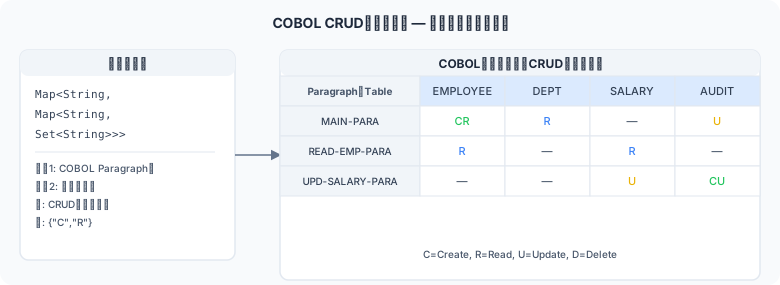
図1: COBOL CRUDマトリクス — Paragraph×テーブルの行列データ構造
CRUD行列はプログラム名 → テーブル名 → 操作セットという2段階のネスト構造で表現します。 Python では辞書のネストで実装します。
from collections import defaultdict
from dataclasses import dataclass, field
from typing import DefaultDict

# プログラム名 → テーブル名 → CRUD操作セット
# 例: matrix['URIAGE-TOROKU']['TOKUI'] = {'R'}
CrudMatrix = DefaultDict[str, DefaultDict[str, set]]

@dataclass
class CrudMatrixResult:
    """CRUD行列の全情報を保持するデータクラス"""
    # matrix[program][table] = {'C', 'R', 'U', 'D'} の部分集合
    matrix: CrudMatrix = field(
        default_factory=lambda: defaultdict(lambda: defaultdict(set))
    )
    # 全プログラム名のリスト(ソート済み)
    programs: list[str] = field(default_factory=list)
    # 全テーブル名のリスト(ソート済み)
    tables: list[str] = field(default_factory=list)
行列の構築
def build_crud_matrix(
    scan_results: list,   # list[ProgramSqlInfo] from PART 03
    jar_path: str | None = None
) -> CrudMatrixResult:
    """
    スキャン結果からCRUD行列を構築する。
    """
    result = CrudMatrixResult()
    all_tables: set[str] = set()

    for info in scan_results:
        prog = info.program_id

        for sql in info.sql_list:
            entries = classify_crud(sql, jar_path=jar_path)
            for entry in entries:
                table = entry.table_name.upper()
                result.matrix[prog][table].update(entry.operations)
                all_tables.add(table)

    # 一般的なシステムテーブル・ビュー名を除外するフィルタ(任意)
    EXCLUDE_TABLES = {'DUAL', 'SYSIBM_SYSDUMMY1'}
    all_tables -= EXCLUDE_TABLES

    result.programs = sorted(result.matrix.keys())
    result.tables = sorted(all_tables)

    return result
操作セットの正規化と表示形式
def ops_to_str(ops: set) -> str:
    """
    操作セットを CRUD 順の文字列に変換する。
    例: {'R', 'C'} → 'CR'
        {'D', 'U', 'R', 'C'} → 'CRUD'
        set() → ''
    """
    order = 'CRUD'
    return ''.join(c for c in order if c in ops)

def get_cell(matrix_result: CrudMatrixResult, program: str, table: str) -> str:
    """行列の特定セルを文字列で取得する"""
    ops = matrix_result.matrix.get(program, {}).get(table, set())
    return ops_to_str(ops)
JSON形式でのエクスポート
import json

def export_to_json(result: CrudMatrixResult, output_path: str) -> None:
    """CRUD行列をJSONファイルにエクスポートする"""
    data = {
        "programs": result.programs,
        "tables": result.tables,
        "matrix": {
            prog: {
                table: ops_to_str(ops)
                for table, ops in tables.items()
            }
            for prog, tables in result.matrix.items()
        }
    }
    with open(output_path, 'w', encoding='utf-8') as f:
        json.dump(data, f, ensure_ascii=False, indent=2)
    print(f'JSON出力: {output_path}')
JSON出力例
{
  "programs": ["SHOHIN-KANRI", "TOKUI-MEISHO", "URIAGE-SHUKEI", "URIAGE-TOROKU"],
  "tables": ["MEISAI", "SHOHIN", "TOKUI", "URIAGE"],
  "matrix": {
    "URIAGE-TOROKU": {
      "TOKUI":  "R",
      "SHOHIN": "R",
      "URIAGE": "CU",
      "MEISAI": "CRD"
    },
    "URIAGE-SHUKEI": {
      "TOKUI":  "R",
      "SHOHIN": "R",
      "URIAGE": "R",
      "MEISAI": "R"
    },
    "SHOHIN-KANRI": { "SHOHIN": "CRUD" },
    "TOKUI-MEISHO": { "TOKUI":  "CRUD" }
  }
}
統計情報の生成
def print_stats(result: CrudMatrixResult) -> None:
    """CRUD行列の統計情報を表示する"""
    print(f'プログラム数: {len(result.programs)}')
    print(f'テーブル数:   {len(result.tables)}')

    # 各テーブルに何プログラムがアクセスしているか
    print('\n--- テーブル別アクセス数 ---')
    for table in result.tables:
        count = sum(
            1 for prog in result.programs
            if table in result.matrix.get(prog, {})
        )
        print(f'  {table:30s}: {count} プログラム')

    # CRUD比率
    total_ops = {'C': 0, 'R': 0, 'U': 0, 'D': 0}
    for prog in result.programs:
        for table, ops in result.matrix[prog].items():
            for op in ops:
                if op in total_ops:
                    total_ops[op] += 1
    total = sum(total_ops.values()) or 1
    print(f'\n--- 操作種別比率 ---')
    for op, cnt in total_ops.items():
        print(f'  {op}: {cnt:4d} ({cnt/total*100:.1f}%)')
✅ 次の章では…
PART 06 では構築済みCRUD行列をMarkdown・Mermaid・PlantUML形式でファイルに出力するPython実装を解説します。GitHubやNotionで即レンダリングできる形式になります。
CRUD行列構築でよくある誤り
プロジェクト全体のCRUD行列を構築する際、データ集約とキー管理を誤ると行列に重複や欠落が生じます。
| 誤り/失敗パターン | 何が起きるか | 正しい対処/防止策 |
|---|---|---|
| ファイル名ではなくプログラム名(PROGRAM-ID)で管理しない | ファイル名変更やリネームでキーが壊れ、同一プログラムが複数エントリになる | COBOLソースのIDENTIFICATION DIVISIONからPROGRAM-IDを抽出し、一意のプログラム識別子として使用する |
| テーブル名の大文字小文字を統一しない | ORDERSとordersが別テーブルとして集計され、行列が重複する | テーブル名を全て大文字(upper())に正規化してから集約し、同一テーブルへのアクセスを確実に統合する |
| CRUD種別の集計を上書きで記録する | 同一プログラム・同一テーブルへの複数操作が最後の操作のみに上書きされ、情報が失われる | セット型でCRUD文字を積み上げ(set.add("C")等)、最終的にソートして"CR"や"CRUD"として出力する |