モックDBでテストを通していたのに本番投入後にデータ不整合が発覚し、Testcontainersで実際のDBを使ったテストに切り替えた経緯があります。REST Assuredと組み合わせた検証パターンを紹介します。
REST Assured のセットアップ
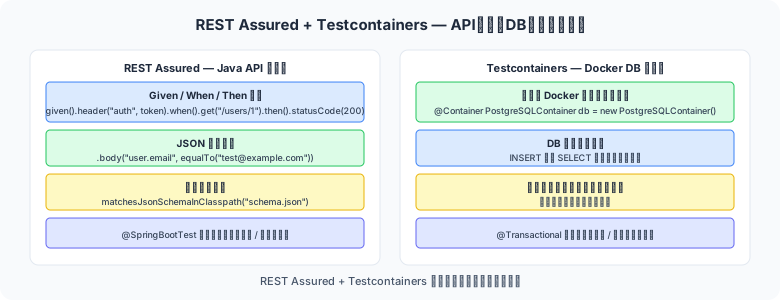
図1: API検証・DB整合性テストの構成
// build.gradle
dependencies {
    testImplementation 'io.rest-assured:rest-assured:5.4.0'
    testImplementation 'io.rest-assured:json-path:5.4.0'
    testImplementation 'io.rest-assured:json-schema-validator:5.4.0'
    // Spring MVC テスト統合(Spring Boot プロジェクトの場合)
    testImplementation 'io.rest-assured:spring-mock-mvc:5.4.0'
}

// Java 9+ では以下の import を static に設定しておくと記述が楽になる
// import static io.restassured.RestAssured.*;
// import static io.restassured.matcher.RestAssuredMatchers.*;
// import static org.hamcrest.Matchers.*;
given / when / then 構文の基本
REST Assured は BDD スタイルの given / when / then で記述します。
import io.restassured.RestAssured;
import io.restassured.http.ContentType;
import org.junit.jupiter.api.*;
import static io.restassured.RestAssured.*;
import static org.hamcrest.Matchers.*;

@TestMethodOrder(MethodOrderer.OrderAnnotation.class)
class UserApiTest {

    @BeforeAll
    static void setup() {
        RestAssured.baseURI  = "http://localhost";
        RestAssured.port     = 8080;
        RestAssured.basePath = "/api/v1";
    }

    @Test
    @Order(1)
    @DisplayName("ユーザー一覧を取得 — 200 OK でリストが返る")
    void getUsers_returns200WithList() {
        given()
            .header("Accept", "application/json")
        .when()
            .get("/users")
        .then()
            .statusCode(200)
            .contentType(ContentType.JSON)
            .body("size()", greaterThan(0))
            .body("[0].id",    notNullValue())
            .body("[0].name",  notNullValue());
    }

    @Test
    @Order(2)
    @DisplayName("ユーザーを新規作成 — 201 Created で ID が返る")
    void createUser_returns201WithId() {
        String requestBody = """
            {
                "name": "山田太郎",
                "email": "taro@example.com"
            }
            """;

        given()
            .contentType(ContentType.JSON)
            .body(requestBody)
        .when()
            .post("/users")
        .then()
            .statusCode(201)
            .body("id",    notNullValue())
            .body("name",  equalTo("山田太郎"))
            .body("email", equalTo("taro@example.com"));
    }

    @Test
    @DisplayName("存在しない ID は 404 を返す")
    void getUser_notFound_returns404() {
        given()
        .when()
            .get("/users/99999")
        .then()
            .statusCode(404)
            .body("errorCode", equalTo("USER_NOT_FOUND"));
    }
}
JsonPath での値抽出と検証
// レスポンスから値を抽出して JUnit アサーションで検証
import io.restassured.response.Response;
import static org.assertj.core.api.Assertions.*;

@Test
void getOrder_extractsAndValidatesItems() {
    Response response =
        given()
        .when()
            .get("/orders/ORD-001")
        .then()
            .statusCode(200)
            .extract().response();

    // JsonPath で個別フィールドを取得
    String  status     = response.jsonPath().getString("status");
    int     itemCount  = response.jsonPath().getInt("items.size()");
    String  firstItem  = response.jsonPath().getString("items[0].name");
    double  totalPrice = response.jsonPath().getDouble("totalPrice");

    assertThat(status).isEqualTo("CONFIRMED");
    assertThat(itemCount).isGreaterThan(0);
    assertThat(totalPrice).isGreaterThan(0.0);

    // ネストした値の検証
    // "items[0].quantity" のように . 記法でネスト可能
    List<String> itemNames = response.jsonPath().getList("items.name");
    assertThat(itemNames).contains("商品A");
}
認証(Bearer Token・Basic Auth)
// ── Bearer Token ──
given()
    .header("Authorization", "Bearer " + accessToken)
.when()
    .get("/users/me")
.then()
    .statusCode(200);

// ── Basic Auth ──
given()
    .auth().basic("admin", "password")
.when()
    .get("/admin/dashboard")
.then()
    .statusCode(200);

// ── OAuth2 トークン取得 → 使用の流れ ──
String token =
    given()
        .contentType("application/x-www-form-urlencoded")
        .formParam("grant_type",    "client_credentials")
        .formParam("client_id",     "my-client")
        .formParam("client_secret", "my-secret")
    .when()
        .post("http://auth.example.com/token")
    .then()
        .statusCode(200)
        .extract().jsonPath().getString("access_token");

// 取得したトークンで API を呼ぶ
given()
    .auth().oauth2(token)
.when()
    .get("/protected-resource")
.then()
    .statusCode(200);
Testcontainers のセットアップ
Testcontainers は Docker を使って本物の DB・メッセージブローカー・各種サービスをテスト中に起動できるライブラリです。
// build.gradle
dependencies {
    testImplementation 'org.testcontainers:testcontainers:1.19.8'
    testImplementation 'org.testcontainers:junit-jupiter:1.19.8'
    testImplementation 'org.testcontainers:postgresql:1.19.8'   // PostgreSQL 用
    testImplementation 'org.testcontainers:mysql:1.19.8'        // MySQL 用
}

// 前提条件: テスト実行環境に Docker がインストールされていること
// GitHub Actions では ubuntu-latest で Docker が使用可能
PostgreSQL コンテナを使った結合テスト
import org.junit.jupiter.api.*;
import org.testcontainers.containers.PostgreSQLContainer;
import org.testcontainers.junit.jupiter.*;
import java.sql.*;
import static org.assertj.core.api.Assertions.*;

@Testcontainers   // JUnit 5 拡張を有効化
class UserRepositoryIntegrationTest {

    // @Container アノテーションで自動起動・停止
    // static にするとクラス内のすべてのテストで共有(起動1回)
    @Container
    static PostgreSQLContainer<?> postgres =
        new PostgreSQLContainer<>("postgres:16-alpine")
            .withDatabaseName("testdb")
            .withUsername("testuser")
            .withPassword("testpass")
            .withInitScript("sql/schema.sql");  // 初期スキーマを流す

    UserRepository repository;

    @BeforeEach
    void setUp() {
        // コンテナの接続情報から DataSource を構成
        String url      = postgres.getJdbcUrl();
        String username = postgres.getUsername();
        String password = postgres.getPassword();

        var dataSource = createDataSource(url, username, password);
        repository = new UserRepository(dataSource);
    }

    @Test
    @DisplayName("ユーザーを保存し、ID で取得できる")
    void save_and_findById() {
        // ── Arrange ──
        User user = new User(null, "山田太郎", "taro@example.com");

        // ── Act ──
        User saved = repository.save(user);
        User found = repository.findById(saved.getId()).orElseThrow();

        // ── Assert ──
        assertThat(found.getName()).isEqualTo("山田太郎");
        assertThat(found.getEmail()).isEqualTo("taro@example.com");
    }

    @Test
    @DisplayName("存在しない ID は Optional.empty() を返す")
    void findById_notFound_returnsEmpty() {
        assertThat(repository.findById(99999L)).isEmpty();
    }
}
Spring Boot + Testcontainers の統合
Spring Boot 3.1 以降では @ServiceConnection で接続情報の自動設定が可能です。
import org.springframework.boot.test.context.SpringBootTest;
import org.springframework.boot.testcontainers.service.connection.ServiceConnection;
import org.testcontainers.containers.PostgreSQLContainer;
import org.testcontainers.junit.jupiter.*;

@SpringBootTest(webEnvironment = SpringBootTest.WebEnvironment.RANDOM_PORT)
@Testcontainers
class UserControllerIntegrationTest {

    @Container
    @ServiceConnection   // Spring Boot が自動で DataSource を設定
    static PostgreSQLContainer<?> postgres =
        new PostgreSQLContainer<>("postgres:16-alpine");

    @LocalServerPort
    int port;

    @BeforeEach
    void setup() {
        RestAssured.port = port;
    }

    @Test
    @DisplayName("POST /users → DB に保存されて 201 が返る")
    void createUser_persistedToDatabase_returns201() {
        given()
            .contentType(ContentType.JSON)
            .body("""
                { "name": "テストユーザー", "email": "test@example.com" }
                """)
        .when()
            .post("/api/v1/users")
        .then()
            .statusCode(201)
            .body("id", notNullValue());
    }
}
✅ Testcontainers Cloud で CI の Docker 制約を回避
一部の CI 環境では Docker in Docker が使えない場合があります。Testcontainers Cloud を使うとコンテナをクラウド側で実行できます。
まとめ
- REST Assured の
given / when / then構文で API テストを Java コードとして管理でき、バージョン管理・コードレビューが容易になる - JsonPath で複雑なレスポンスの特定フィールドを抽出し、JUnit アサーションと組み合わせて詳細に検証できる
- Testcontainers は H2 などのインメモリ DB の代替として本物の Docker DB を使用し、本番環境との差異を排除できる
- Spring Boot 3.1+ の
@ServiceConnectionで設定コードを最小化できる - GitHub Actions(ubuntu-latest)では Docker が標準で使えるため、CI への組み込みが容易